

How to Photograph Your Neon Sign
A neon sign is one of the most photogenic things you can own. That glow is made for photos, which is why neon backdrops fill weddings, cafes, and social feeds. The catch is that neon does not always photograph the way it looks in person: it can wash out to white, throw odd color casts, or flicker on camera. The good news is that a few simple habits fix all of it, and you do not need a fancy camera. This page is part of our collection of neon sign ideas, and it walks through lighting, camera and phone settings, how to beat glare and flicker, framing, selfies, and editing, so your sign looks as good in a photo as it does on the wall.

Why Neon Is Tricky to Photograph
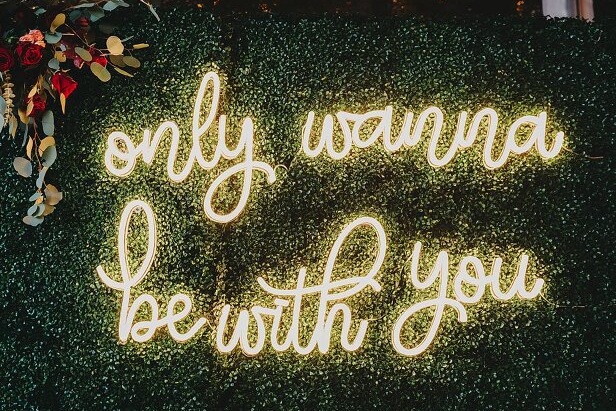
Neon is a bright, colored light in a room that is usually darker around it, and that gap is what trips up cameras. Left on automatic, the camera tries to brighten the whole scene, which overexposes the sign until the color blows out to a white glare and you lose the shade you love. Neon also casts its color on everything nearby, so skin and walls can pick up an unnatural tint. And because neon is a pulsing light, it can show up as flicker or banding lines, especially in video. None of this is hard to fix once you know what is happening, and the rest of this guide walks through each one.
Get the Lighting Right
Lighting is where most neon photos are won or lost.
- Shoot in low, soft light. Neon glows best when the room around it is dimmer, so the color stands out. Turn down the main lights, but do not go pitch black, or your subject and background will disappear.
- Control the sign’s brightness. If your sign has a dimmer, lower it so the color reads richer instead of blowing out. If it does not, you can lower the brightness in your camera instead, which we cover next.
- Skip the flash. Flash is the fastest way to ruin a neon photo. It flattens the glow, washes out the color, and bounces back as glare. Leave it off and let the neon light the shot.
- Outdoors, shoot at dusk. Twilight gives you enough ambient light to see the scene while the neon still pops.
Camera and Phone Settings That Work
You can get a great neon photo on a phone. A few settings make the difference:
- Tap and lower the exposure. Tap the sign on your screen to focus, then slide the exposure down until the color looks true. This is the single most useful trick for neon.
- Lock your focus. Tap and hold to lock focus and exposure so they do not drift between shots.
- Keep the flash off. Set it to off, not auto.
- Use night mode with care. Night mode can help in very low light, but it sometimes brightens the sign too much, so check the result and turn it off if the color washes out.
- Go manual for more control. If your phone or camera has a pro or manual mode, shoot in RAW for more editing room, set your own white balance so the color looks right, and set your shutter speed to control flicker.
Avoid Glare, Blur, and Flicker
Three common problems have easy fixes.
Glare and reflections. If the sign sits behind glass or on a shiny wall, move a step to the side so hotspots and your own reflection fall out of frame. A slight angle usually beats shooting straight on.
Blur. In low light your camera uses a slower shutter, which shows every shake. Brace your elbows, lean on a wall, or use a small tripod to keep it sharp.
Flicker and banding. Because neon pulses, video can pick up flickering or rolling bands across the sign. Both glass and LED can do this, and it shows up most in video and slow-motion. To fix it, switch to your camera’s pro or manual mode and set a standard shutter speed for your region, such as 1/60 or 1/50, and avoid slow-motion, which makes flicker worse. If you have a color-changing sign, our guide to RGB and color-changing neon signs covers the remote dimmer that also helps you dial in the brightness for a shot. For anyone who films with a sign in frame often, like a streamer or podcaster, our guide to neon signs for podcast studios has more on keeping neon clean on camera.
Frame a Great Shot
With the light and settings sorted, framing is what makes the photo feel intentional.
- Use the rule of thirds. Place the sign a little off-center rather than dead middle for a more natural composition.
- Clear the background. A tidy, simple backdrop lets the neon be the star. Move clutter out of frame.
- Do not cut it off. Include the whole sign so the words or shape read clearly, or deliberately crop to one word for emphasis.
- Play with angles. Try eye level, a low angle looking up, or a slight tilt, and take a few to compare.
- Let the color lead. A shade that contrasts with the wall photographs best. Our guide to neon sign ideas by color has more on which colors pop.
Selfies and Portraits with Neon
Neon makes a flattering, moody light for people. To get it right:
- Face the light. Turn toward the sign so its glow falls on your face, or stand beside it to light one side for a softer, more dramatic look.
- Lower the exposure. Bring the brightness down so both your skin and the neon color look right, rather than a blown-out sign behind a dark face.
- Keep the flash off. As always, flash kills the glow.
- Mind the color cast. Warm colors like pink and orange tend to flatter skin, while strong greens can read a little unusual, so take a few frames and see what you like.
- Take more than you think. Colored light changes how a photo reads, so shoot several and pick the best.
Edit Without Losing the Glow
A light edit takes a good neon photo further, as long as you keep it natural.
- Favor vibrancy over saturation. Vibrancy lifts the color gently, while heavy saturation can turn neon garish and blow out the glow.
- Pull the highlights down. This recovers detail in the brightest part of the sign so the color returns.
- Fix the white balance. If skin or the background looks too warm or too cool, nudge the temperature until it looks natural.
- Keep it believable. The goal is the sign as your eye saw it, glowing and rich, not a neon explosion.
Start With a Sign Worth Photographing
Great neon photos start with a sign worth photographing. For inspiration, browse our gallery to see how our signs look glowing in real spaces, and when you are ready to make your own, design your custom neon sign in whatever color, font, and words will look best on your wall and in your feed.

Frequently Asked Questions
Shoot in low, soft light so the neon glow stands out, lower your camera’s exposure so the color does not blow out to white, and skip the flash. Steady your phone or camera, frame the sign with a clean background, and take a few angles to find the best one.
Neon is bright against a darker room, so the camera often overexposes it and the color washes out to white. Tap the sign on your screen and lower the exposure, or dim the sign if it has a dimmer, until the color looks rich and true.
Flicker and banding lines usually show up in video when the camera’s shutter speed does not match the light. Switch to your camera’s pro or manual mode and set the shutter speed to a standard value for your region, such as 1/60 or 1/50, and avoid slow-motion, which makes flicker worse.
No. Flash flattens the neon glow, washes out the color, and often bounces back as glare off the sign or the wall. Turn the flash off and let the neon and the room light do the work.
Lower your exposure so the color holds, keep the flash off, and lock your focus on the sign. If your phone or camera has a pro or manual mode, shoot in RAW and set your own shutter speed and white balance for the best color and the least flicker.
Face the sign so its light falls on you, or stand beside it so it lights one side of your face. Lower your exposure so your skin and the color both look right, keep the flash off, and take a few frames, since colored light changes how a photo reads.
Make Your Sign Shine
Photographing a neon sign comes down to a few habits: shoot in low light, lower your exposure so the color holds, keep the flash off, steady the shot, and set a standard shutter speed to beat flicker. Get those right and your sign looks as vivid in a photo as it does in the room. For more ways to get the most from your sign, see our full collection of neon sign ideas.